Bullseye Get the app
Live

Live Wind

Understand what's happening.

Let the solver do the math. You read the conditions and make the shot. Live Wind streams the wind direction and speed into the solver: what the wind is doing now, plus the high, low and average from the last two minutes. Your bracket identified, and your hold within it, calculated and on screen.

Works with the Calypso Ultrasonic Wind Meter.

01

Your dial, front and center.

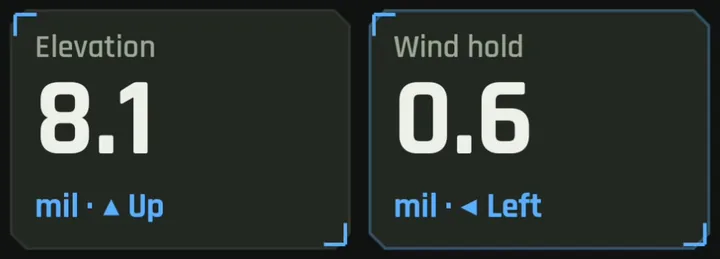
Elevation and wind hold sit at the top in big, clear numbers rounded to the click, with plain Up and Left arrows. Glance, dial, shoot.

Elevation 8.1 mil up and wind hold 0.6 mil left, shown in large numbers at the top of the Live Wind screen.
02

A wind clock that shows the whole picture.

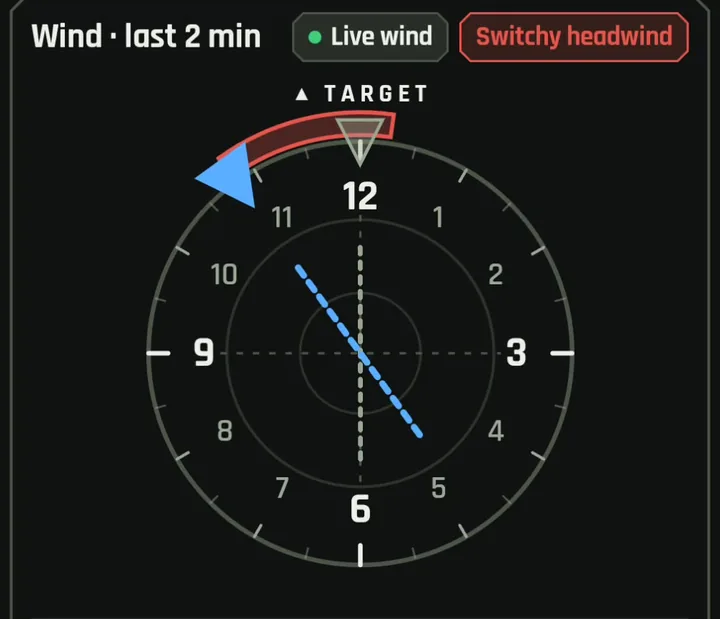
Your target sits at 12 o'clock. The blue arrow shows where the wind is coming from right now. The shaded arc shows how far it has swung over the last two minutes. A quick label like "Switchy headwind" tells you what kind of wind you're dealing with before you read a single number.

Wind clock with the target at 12 o'clock, a blue arrow showing wind from about 11 o'clock, a shaded arc showing the two-minute swing, and a Switchy headwind label.
03

Wind speed you can read at a glance.

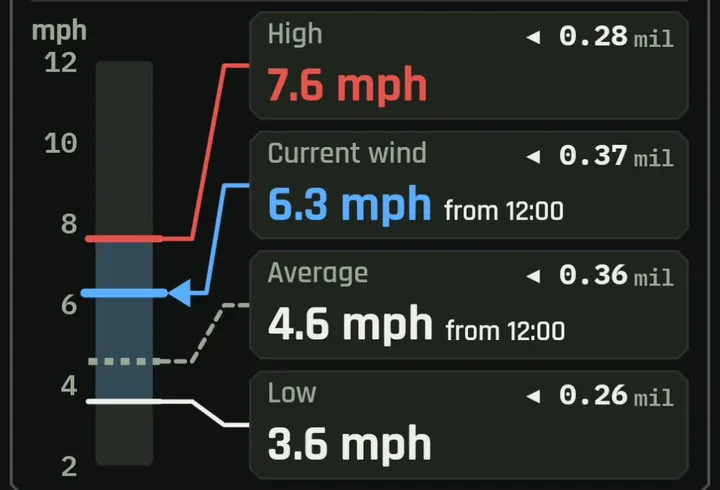
A vertical speed bar shows the wind right now, along with the High, Average and Low over the last two minutes. Each reading has its own box with its speed and the exact hold it calls for, and the current and average winds show where they're coming from. The bar rescales on its own as conditions change, from a gentle breeze to a 50 mph gust, so the readings never pile up or run off the scale.

Vertical wind speed bar from 2 to 12 mph with marks for High 7.6, Current 6.3, Average 4.6 and Low 3.6 mph, each linked to a box showing its wind hold in mil.

Why doesn’t the strongest wind need the most hold?

In this example, the highest wind speed (7.6 mph) doesn’t produce the largest hold. That’s not a mistake. The solver accounts for wind direction, not just speed.

Only the part of the wind blowing across the bullet’s path moves it left or right. A wind straight from 12 o’clock (a pure headwind) pushes almost nothing sideways, while a wind from 3 or 9 o’clock is “full value” and pushes the most. Even a few degrees off dead-center makes a measurable difference at long range.

Here, the 7.6 mph gust came almost straight down the line, so it needed only 0.28 mil. The lighter 6.3 mph current wind is also shown “from 12:00,” since directions are rounded to the nearest half hour on the clock, but it was angled slightly more across the bullet’s path, so it needs 0.37 mil, the largest hold on the screen.

You might also wonder why a near-headwind needs any hold at all. That’s spin drift: the bullet’s rotation causes it to drift slightly to one side over a long flight, regardless of wind. The solver folds spin drift into every hold, so even a dead-on headwind shows a small correction.

The takeaway: wind speed alone doesn’t tell you your hold. Direction matters just as much, and the solver does that math for you on every reading, spin drift included - all while you're behind the rifle, in the scope, and NOT breaking position.

04

Holds for every condition, not just the average.

When the wind is switching, the gust isn't always the one that pushes hardest. Live Wind solves a hold for the wind right now and for the High, the Low and the Average. You can see your range of holds before you break the shot, and pick your moment.

05

Matched to your bullet.

The hold the solver gives you is worked out from wind smoothed over a window matched to your bullet's time of flight, so it reflects the wind your bullet will fly through, not just a split-second gust at the meter. How the smoothing works.

Reading the Live Wind display

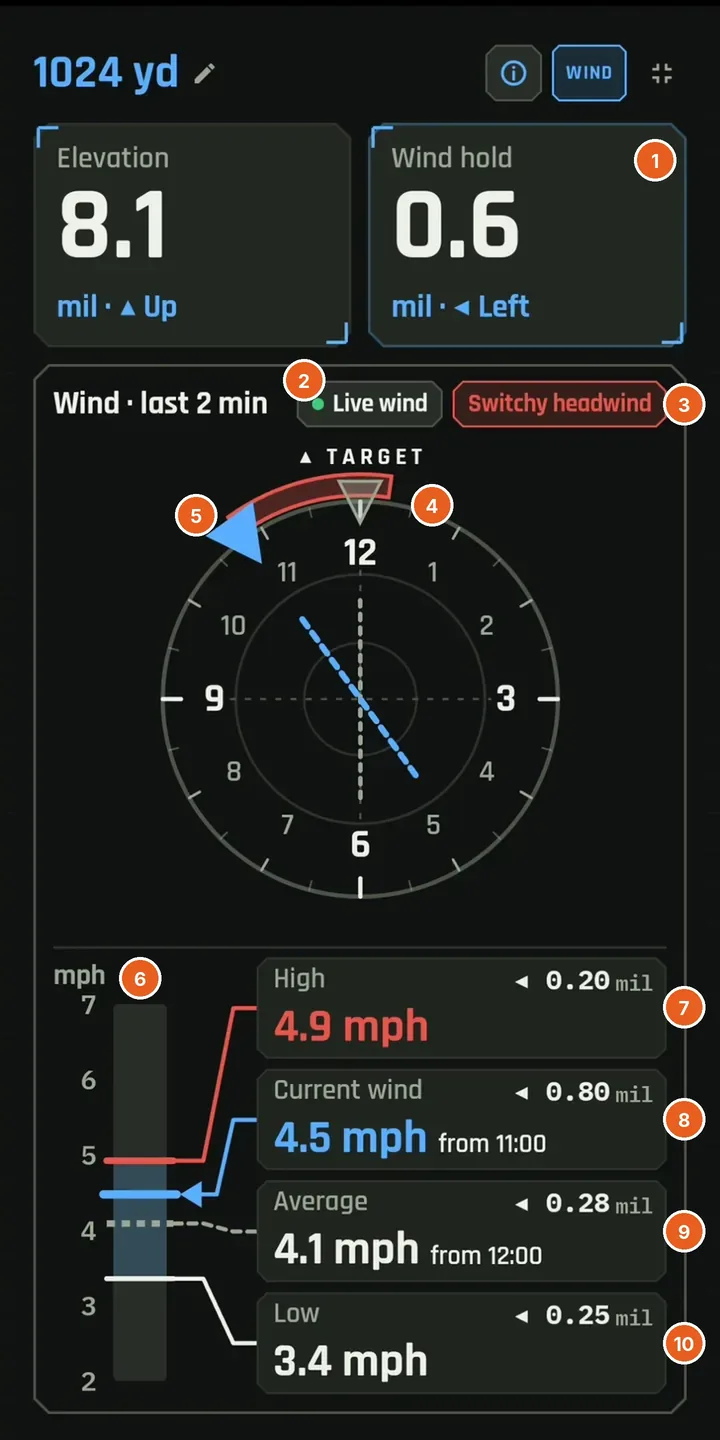
The Live Wind screen with numbered markers 1 through 10 on the wind hold, the Live wind chip, the Switchy headwind warning, the red direction arc, the blue wind arrow, the speed bar, and the High, Current wind, Average and Low readings, explained in the list beside it.
  1. Wind hold: your firing solution Uses everything: your bullet, muzzle velocity, range, spin drift, and the wind. Wind is smoothed over the last several seconds of speed and direction, longer at longer range, so the hold won't jump with every split-second flicker. That's why it can differ from the Current wind hold.
  2. Live wind Green dot means the wind meter is connected and streaming.
  3. Switchy headwind warning Over the last 2 minutes the wind has been swinging back and forth around 12 o'clock. A small shift from 11 to 1 flips the push from one side to the other, so watch the wind and time your shot.
  4. Red arc: 2-minute direction spread The range of directions the wind has come from over the last 2 minutes. Here it straddles 12 o'clock, which triggers the Switchy headwind warning.
  5. Blue arrow: wind direction now Points to where the wind is coming from this second (11 o'clock). The dashed blue line shows its path across the target line.
  6. Speed bar: last 2 minutes The shaded band is the range of wind speeds over the rolling 2-minute window. Red = high, blue = current, dashed = average, white = low.
  7. High Strongest wind in the rolling 2-minute window, and the hold it would need.
  8. Current wind Right this second: live speed, direction (o'clock), and hold.
  9. Average Rolling 2-minute average of speed and direction, and its hold.
  10. Low Lightest wind in the rolling 2-minute window, and its hold.

Bring Live Wind to your next range day.

Live Wind works with the Calypso Ultrasonic Wind Meter. Pair it in seconds and the solver updates in real time.