Bullseye Get the app
Load development

Every ladder rung. Every group.
Every result, kept.

Run charge ladders and seating depth tests in Bullseye Ballistics. Each rung keeps its chronograph readings and the actual groups you shot with it, from a photo of the target or the group's dimensions, filed under the rifle that fired them.

Compare the rungs on one chart. Turn the winner into a load with one tap. Months from now, the whole test is still there for the next decision.

Charge laddersSeating depth testsVelocity per rungGroups per rungVelocity checks
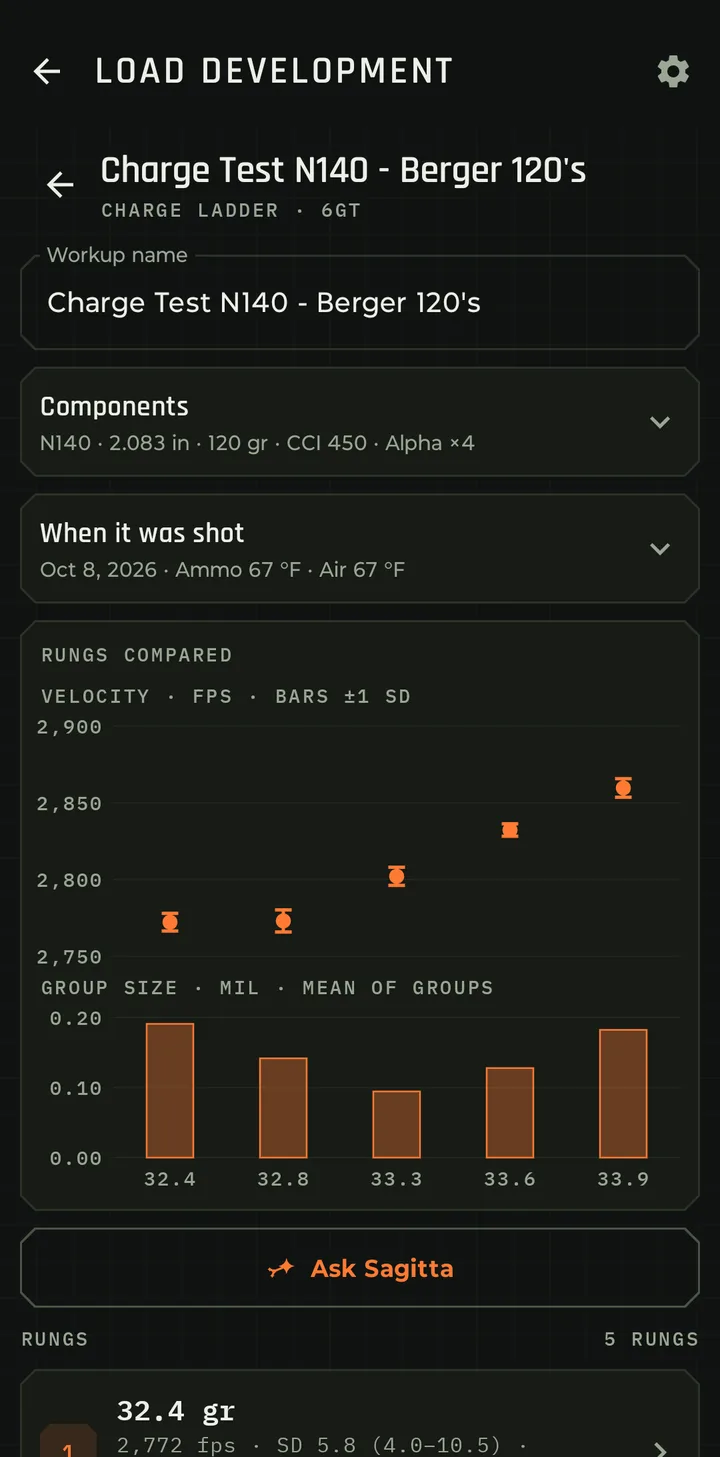
Charge Test N140 - Berger 120's, a charge ladder on the 6GT shot Oct 8, 2026. The Rungs compared card plots mean velocity with bars of plus or minus 1 SD for five charges from 32.4 to 33.9 grains, and the mean group size of each rung below it.
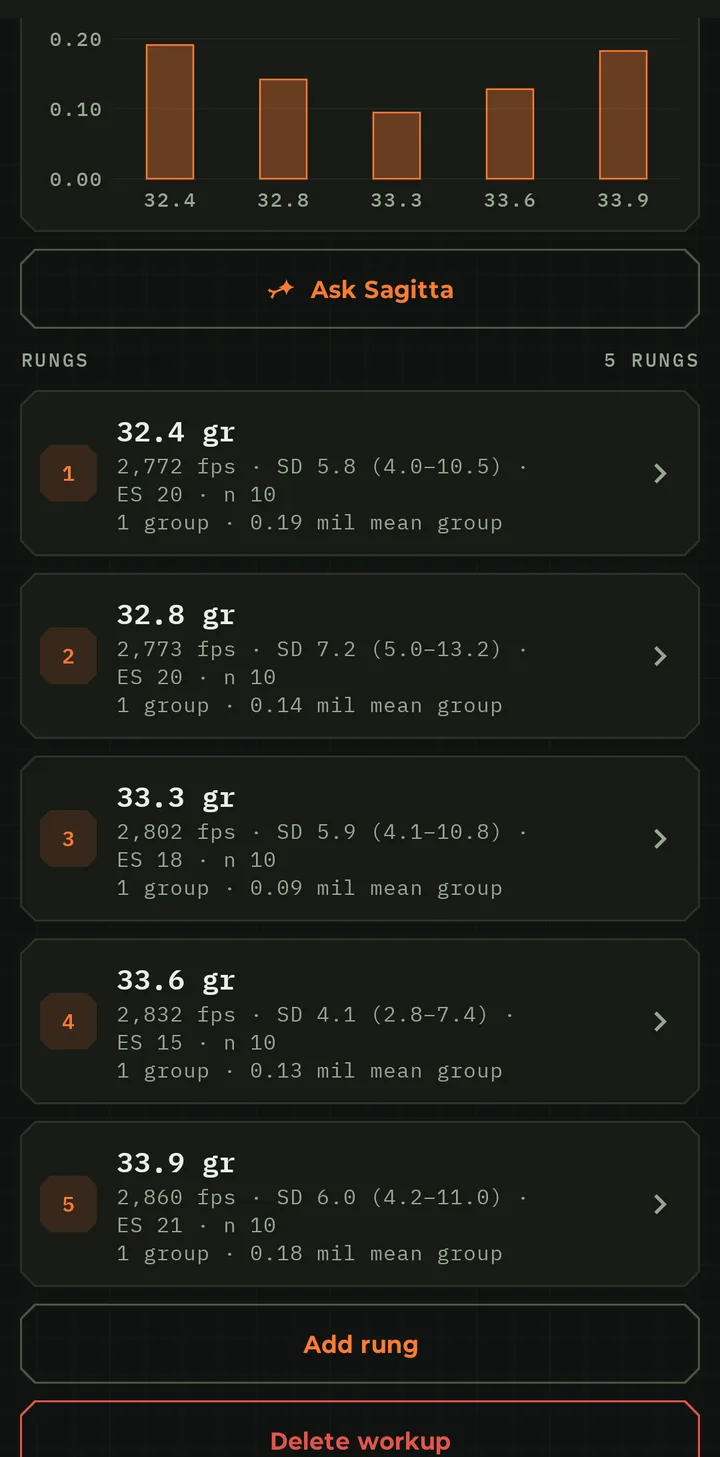
The rungs list for the same workup: each charge with its average velocity, SD and range, ES, 10 readings and 1 group with its mean group size in mil.
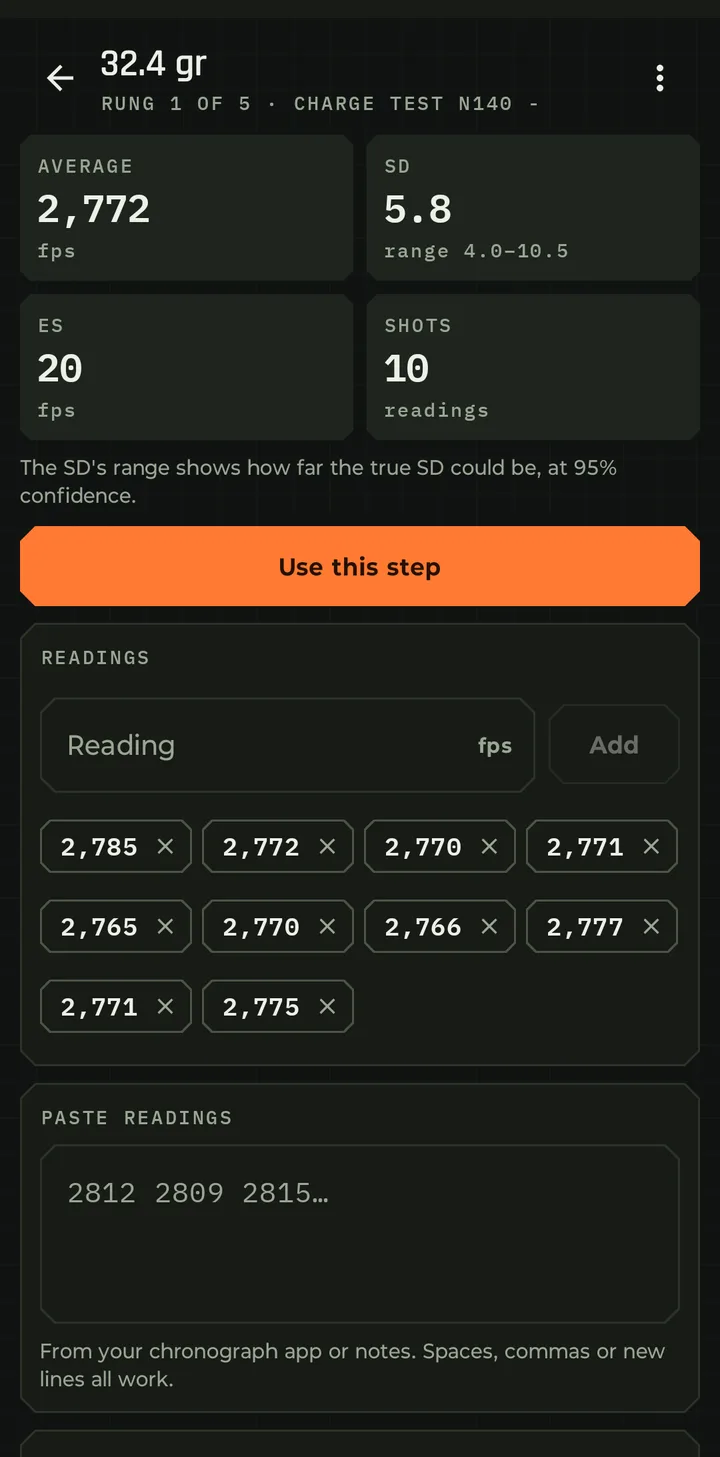
Rung 1 of 5, 32.4 grains: average 2,772 fps, SD 5.8 with a range of 4.0 to 10.5, ES 20 fps from 10 readings, a Use this step button and the ten readings as chips.

Three ways to keep a load log

Load development is only as good as the notes you can find later. Here's how the usual ways hold up when you need last spring's ladder.

The notebook

Handwritten logs

  • Hard to find. Which notebook, which page, which rifle? Was that before or after the new barrel?
  • Math by hand. Averages, SD and ES on a calculator at the bench, or not at all.
  • Groups live somewhere else. The targets are in a box, if you kept them, and nothing ties a target to its rung.
  • One copy. Rain, a coffee spill or a lost range bag, and the test is gone.
The spreadsheet

Better, still annoying

  • Searchable, once you're home. At the range you're still writing on the box and typing it up later.
  • Formulas break. Add a reading and the SD cell doesn't reach it. Every ladder needs its own copy of the sheet.
  • Groups are just numbers. A size in a cell, without the shots, the distance or the load it came from.
  • Two places for one answer. The sheet holds the result, but your solver doesn't use it. Pick a winner and you still type the charge and velocity into your ballistics app by hand, and do it again every time you update one of them.
Bullseye Ballistics

Built for the bench and the range

  • Filed by rifle, with the test type, the charges or depths and the rungs fired on every row.
  • No math by hand. Copy the velocities from your chronograph's app and paste them into the rung. The app works out the average, SD and ES for you.
  • Real groups on every rung: a photo of the target measured in the app, or the group's dimensions typed in. Saved for later analysis.
  • Brass firings kept with every test, so you know how many times the brass had been fired when you shot it.
  • One tap to a load. Use this step writes the charge, seating and velocity into your load and the solver.
How it works

From first rung to finished load

Set up

Pick the test type and rifle, enter starting point, ending point and desired step size, and let the app build the rungs.

Shoot

Paste each rung's chronograph readings and add the groups you shot with it: a target photo or the dimensions.

Compare

Velocity and group size for every rung, side by side on one chart.

Use it

Turn the rung you choose into a new load, or update one you have.

Load Dev is on the Home screen. You can also start a workup from any rifle: open it in Profiles and tap New workup under Workups.

Walkthrough

Start a workup in three steps

A workup is one ladder test. Setting one up takes under a minute, and the X at the top closes it without saving.

What you're testing

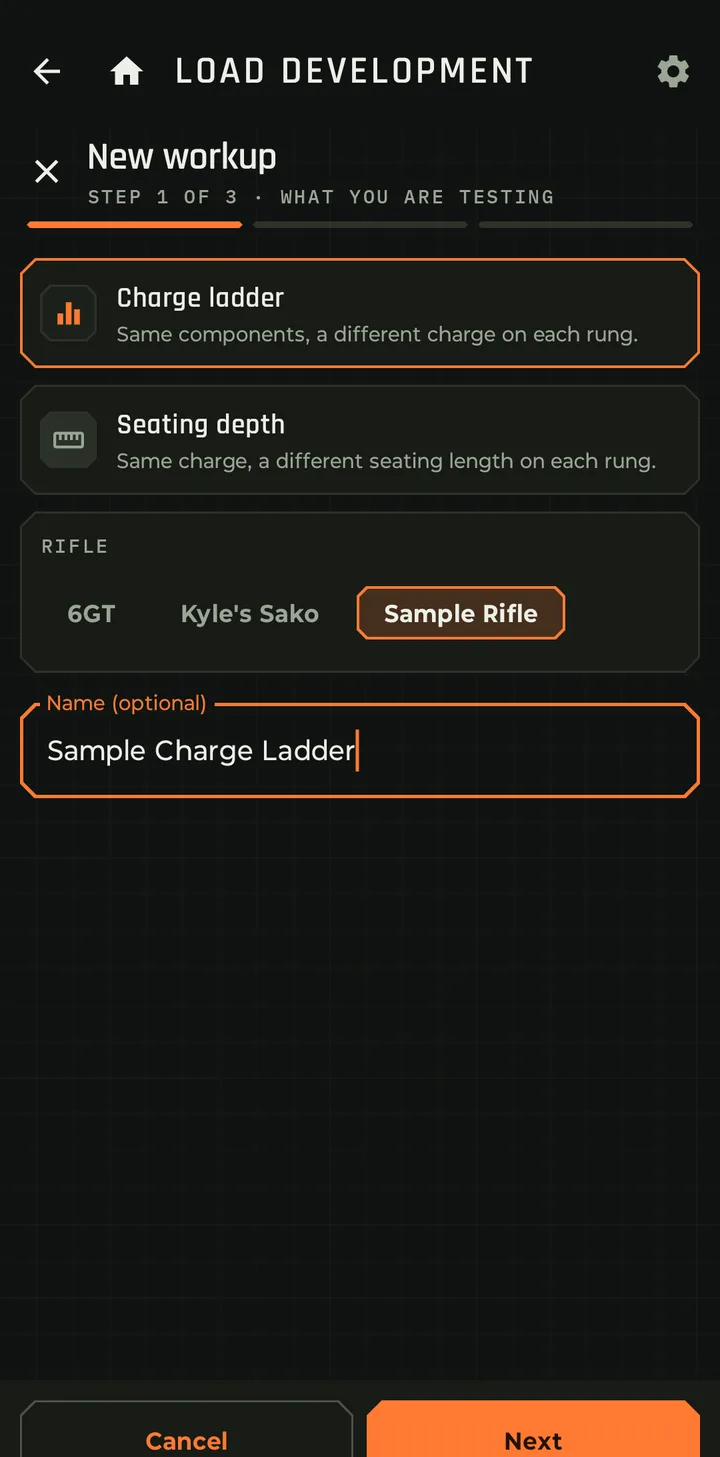
  • Charge ladder: the same components, a different powder charge on each rung. Shot over a chronograph, it's your velocity ladder too.
  • Seating depth: the same charge, a different seating length on each rung, measured as CBTO or COAL.
  • Pick the rifle and give the test a name, or leave the name blank.
New workup, step 1 of 3, What you are testing: Charge ladder or Seating depth, rifle chips for 6GT, Kyle's Sako and Sample Rifle, and an optional name.
Step 1 of 3

Charge ladder or seating depth, and the rifle.

What stays the same

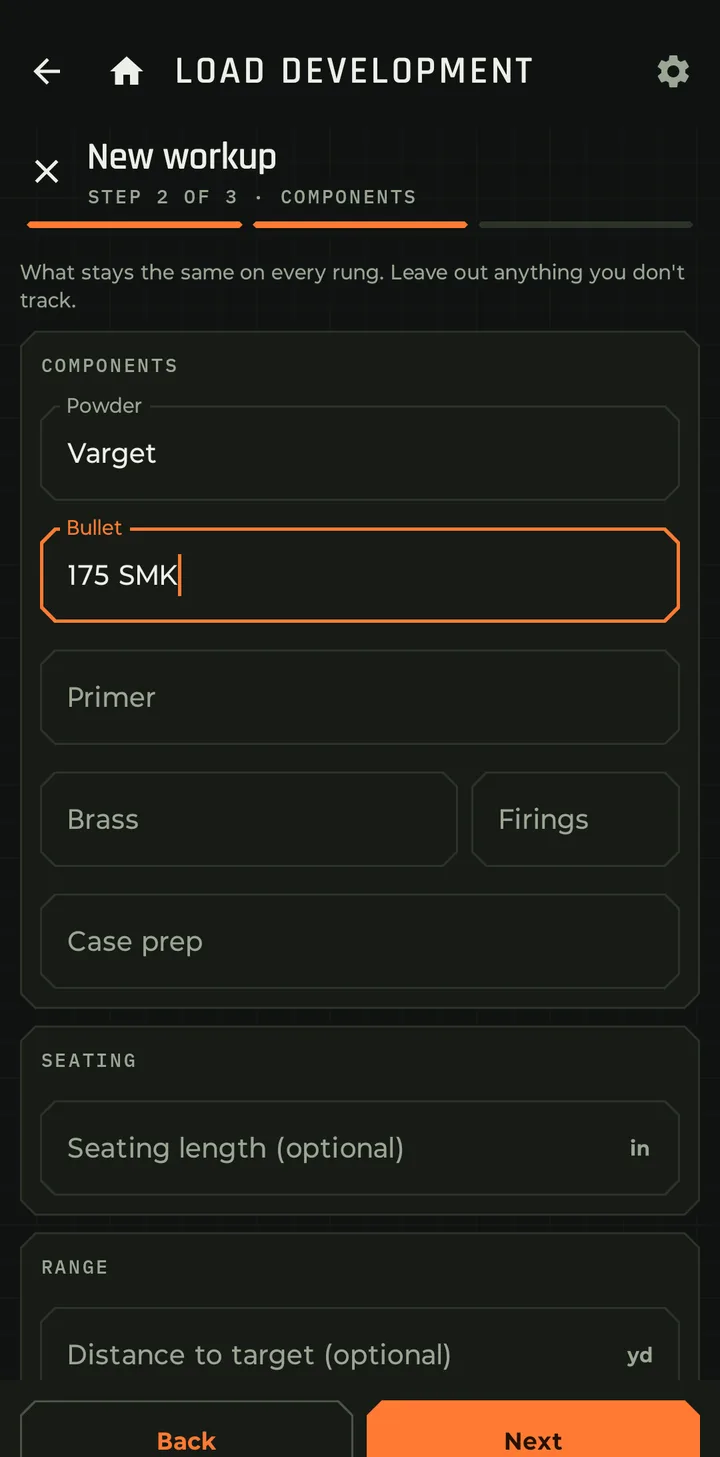
Enter the parts of the recipe that don't change from rung to rung: powder, bullet, primer, brass and how many times it's been fired, case prep, seating length and distance to target. Leave out anything you don't track.

Brass firings: the Firings box next to Brass records how many times that brass has been fired. The test shows it with the brass, such as Alpha ×4 for Alpha brass on its fourth firing, so you can compare results on new brass and well-used brass.

These stay with the test, so a year from now you know exactly what was in the case.

New workup, step 2 of 3, Components: powder Varget, bullet 175 SMK, and empty fields for primer, brass, firings, case prep, seating length and distance to target.
Step 2 of 3

Components, seating and distance.

Let the app do the math

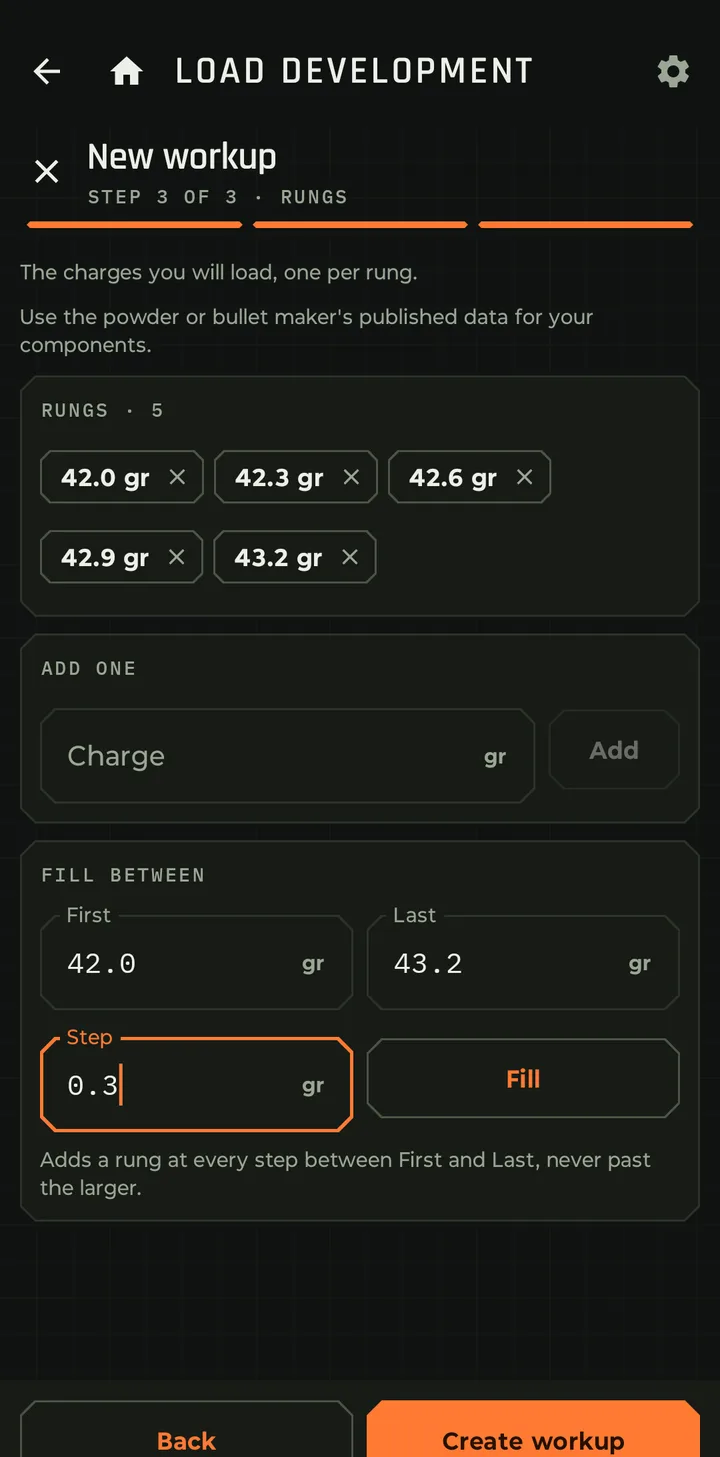
  • Fill between: type the first charge, the last and the step. 42.0 to 43.2 gr in 0.3 gr steps gives five rungs: 42.0, 42.3, 42.6, 42.9 and 43.2.
  • Add one adds a single rung anywhere in the list. Tap the X on a chip to drop one.
  • Create workup and the rungs are ready for readings. You can add more rungs later.
New workup, step 3 of 3, Rungs: five chips from 42.0 to 43.2 grains, an Add one field, and Fill between with First 42.0, Last 43.2 and Step 0.3.
Step 3 of 3

Fill between builds the ladder.

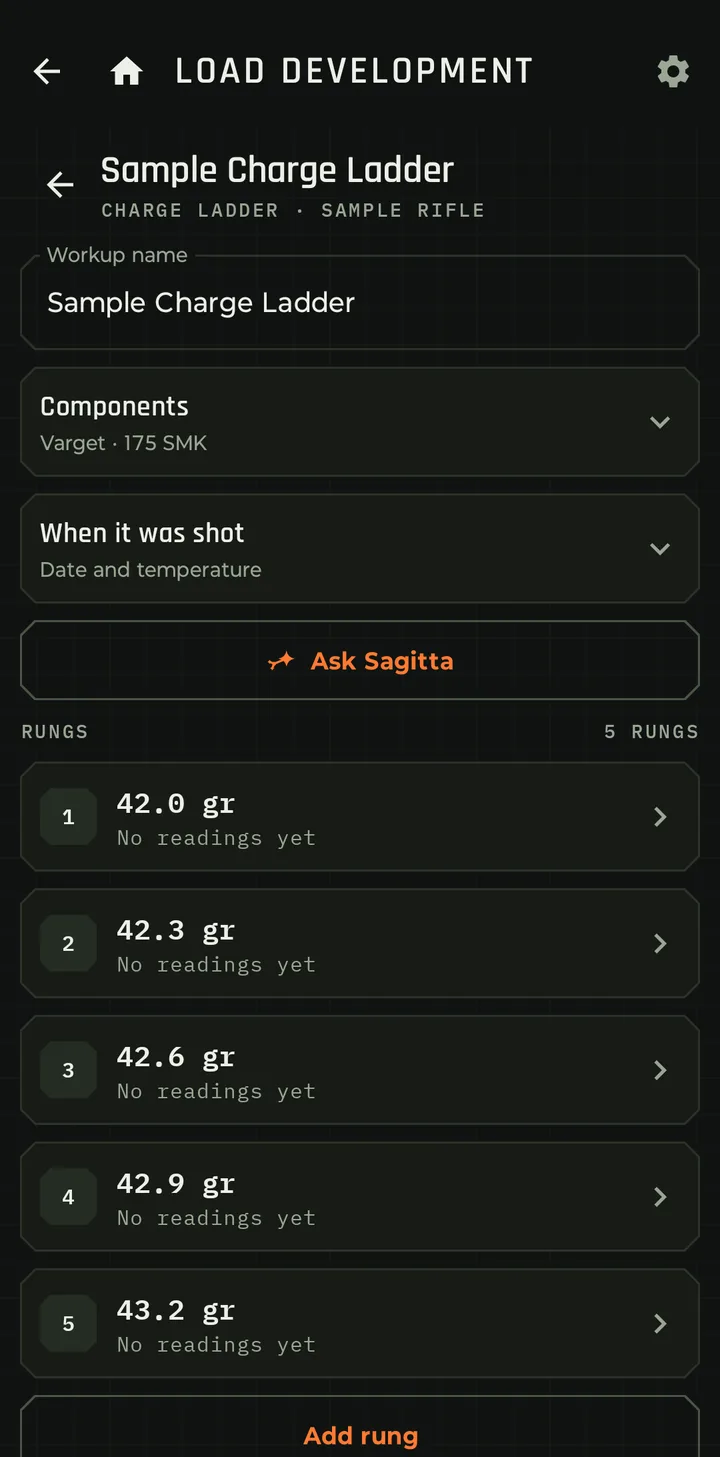
The new workup: name, components summary Varget and 175 SMK, When it was shot, Ask Sagitta, and five rungs from 42.0 to 43.2 grains, each showing No readings yet.
Ready to shoot

Five rungs, waiting for readings.

Walkthrough

Record each rung at the range

Tap a rung to open it.

  • Paste readings straight from your chronograph app. Spaces, commas or new lines all work. Or type them one at a time.
  • The stats fill in: average velocity, SD, ES and the number of shots. Remove a reading and they update.
  • SD with a range. Under the SD you see how far the true SD could be, at 95% confidence. Ten shots at SD 5.8 could really be anywhere from 4.0 to 10.5. More shots narrow it, so you know when a rung's numbers are solid and when they're luck.
  • When it was shot keeps the date and the ammo and air temperature with the test.
Rung 1 of 5, 32.4 grains: average 2,772 fps, SD 5.8 with a range of 4.0 to 10.5, ES 20 fps, 10 readings shown as removable chips, and a Paste readings box.
One rung

32.4 gr: 2,772 fps, SD 5.8 (4.0 to 10.5), ES 20, 10 shots.

Walkthrough

The groups you actually shot, on every rung

Velocity is half the story. Bullseye Ballistics stores the actual groups you fired with each rung, not just a number you wrote in the margin. Take a photo of the target and measure the group in the app, or enter its dimensions. Either way it's saved with the rung, so they're there to compare now and to analyze later.

On the rung

New group or Link a group

At the bottom of a rung, New group records a group for it. Link a group attaches one you've already saved in Groups. Two ways to record it:

  • Photo: photograph the target and mark the impacts. The app measures the group.
  • Dimensions: enter each impact by hand, or type in the group size and mean radius from another tool.
Fair comparison

The mean, not the best

Shoot two or three groups per rung and the rung shows the mean group size, so one lucky group doesn't stand for the whole rung. A linked group stops counting toward a load's spread while it belongs to the test.

For later

Kept for analysis

Each group keeps its shots, size and mean radius, and its target photo stays on your phone. Sagitta reads every rung's readings and groups when you ask about a workup, and the measurements are in your backup and data export.

Five rungs from 32.4 to 33.9 grains, each with its velocity stats and its group: 0.19, 0.14, 0.09, 0.13 and 0.18 mil mean group.
Groups in the rungs list

33.3 gr: 0.09 mil mean group, the tightest of the five.

The Rungs compared card: velocity with plus or minus 1 SD bars above, and group size in mil as the mean of each rung's groups below.
Group size, charted

Each bar is the mean of that rung's groups.

Walkthrough

Compare the rungs at a glance

Open the workup and the Rungs compared card puts the whole ladder on one axis.

  • Velocity: each rung's average, with bars of plus or minus 1 SD. Look for rungs where the velocity barely moves as the charge goes up.
  • Group size: each rung's mean group in mil, right under its velocity.
  • The rungs list gives the numbers behind each point: charge, velocity, SD and its range, ES, shot count and group size.
  • Your call. The points aren't joined by a trend line and the app doesn't announce a node. You see the data as it is and decide, or ask Sagitta for a second opinion.
Charge Test N140 - Berger 120's: velocity climbs from about 2,772 fps at 32.4 grains to about 2,860 at 33.9, with 32.4 and 32.8 grains nearly level, and group size bars below.
Charge Test N140

32.4 and 32.8 gr sit level at about 2,772 fps.

Ask Sagitta

A second opinion on your ladder

Tap Ask Sagitta on a workup and Sagitta Ballistics AI opens with the test already in view. It reads every rung's readings, stats and groups from your records, not from a summary you type in.

Which rung looks best?

Weighs velocity spread and group size together, rung by rung.

Is there a flat spot?

Looks for charges where velocity holds steady.

What should I test next?

Can offer a card that adds up to five rungs, or a note to the workup.

Stays inside your data

Suggested charges stay within the range you've already fired. Never above your top rung.

The first time you use Sagitta with load development, it asks you to read and accept a short safety notice. Always follow published load data and work up carefully. More about Sagitta →

Walkthrough

Use this step: from rung to load

Found your rung? Open it and tap Use this step. Choose New load, named after the workup and the rung, or Update a load you already have.

  • The recipe: a charge ladder writes the rung's charge (and the seating length, if you recorded one). A seating test writes the seating length and its measure, plus the charge.
  • The velocity: the rung's average becomes the load's muzzle velocity, so the solver uses what you measured.
  • The temperature table moves to the new velocity and keeps its slope.
  • A fresh start where it matters: truing starts over, and cold-bore and clean-bore velocities are cleared when the recipe changes, because the old numbers belonged to a different load.
  • A velocity check is saved from the rung's readings, and the rung remembers which load it became.
A rung with the Use this step button under its stats.
Use this step

Right under the rung's stats.

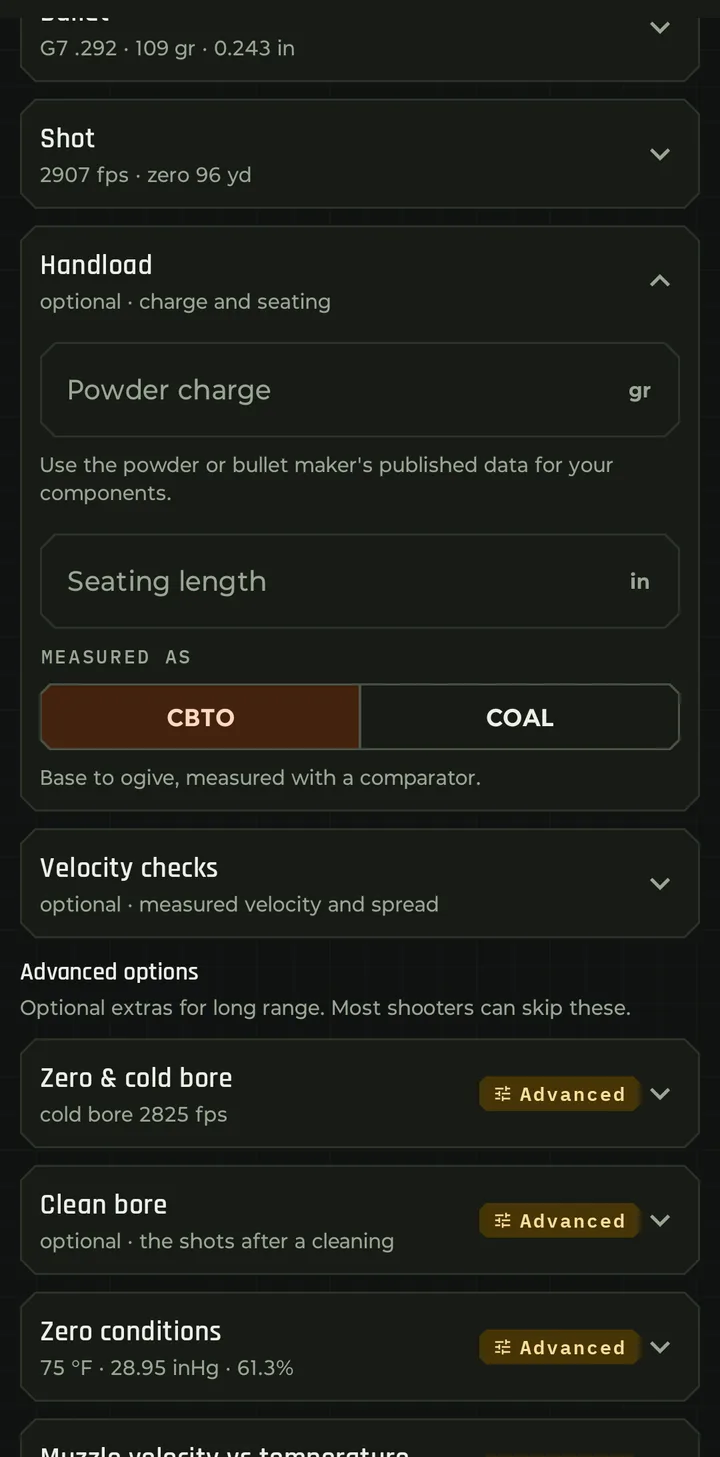
Rifle Setup for a load, with the Bullet, Shot, Handload and Velocity checks sections. Handload holds the charge and seating.
In your load

The charge and seating land in Handload, the velocity in Shot.

After the workup

Keep checking velocity as the barrel wears

A load isn't finished when the ladder is. Barrels speed up or slow down over their life. Velocity checks on each load keep a running record, and every check made on the day it's shot is stamped with the barrel and its round count.

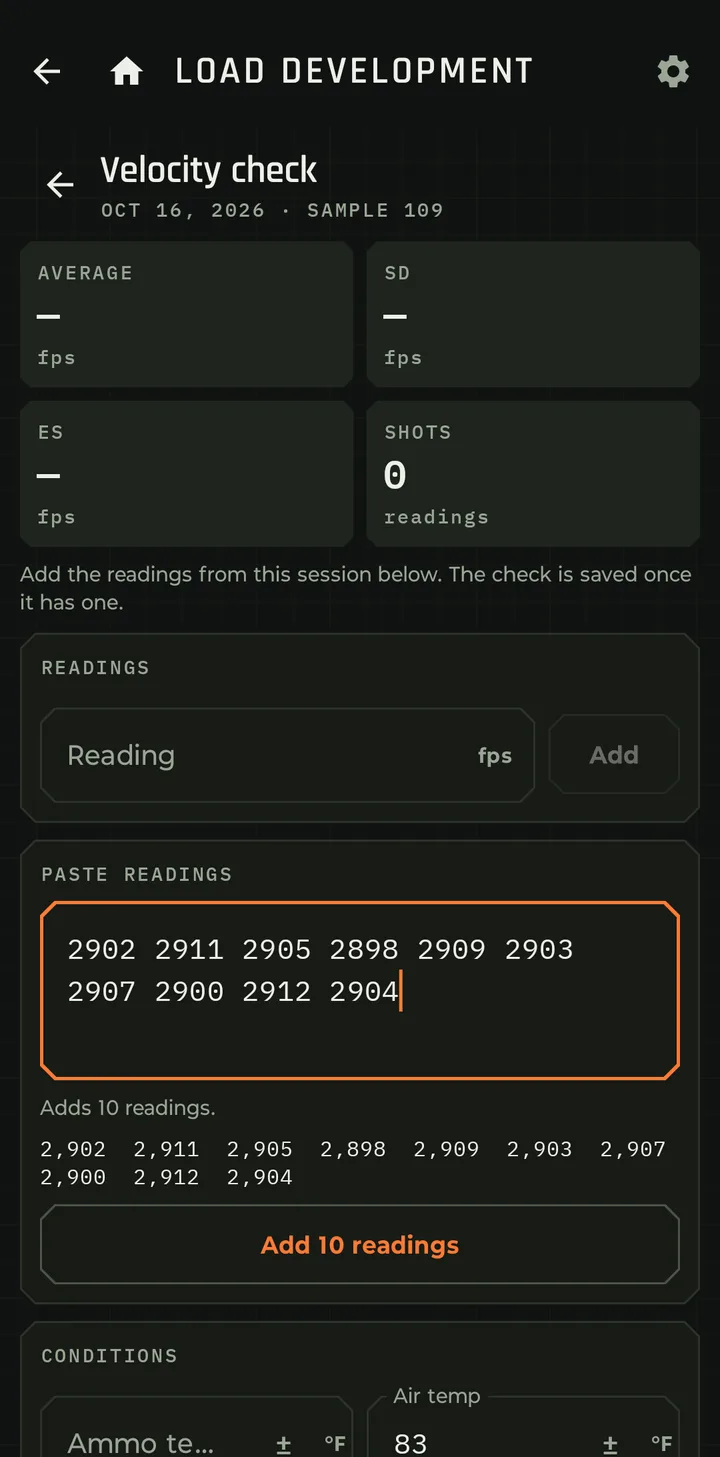
A new velocity check for Sample 109 on Oct 16, 2026, with ten readings pasted in and an Add 10 readings button.
Paste

Paste a chronograph session. The button counts the readings it found.

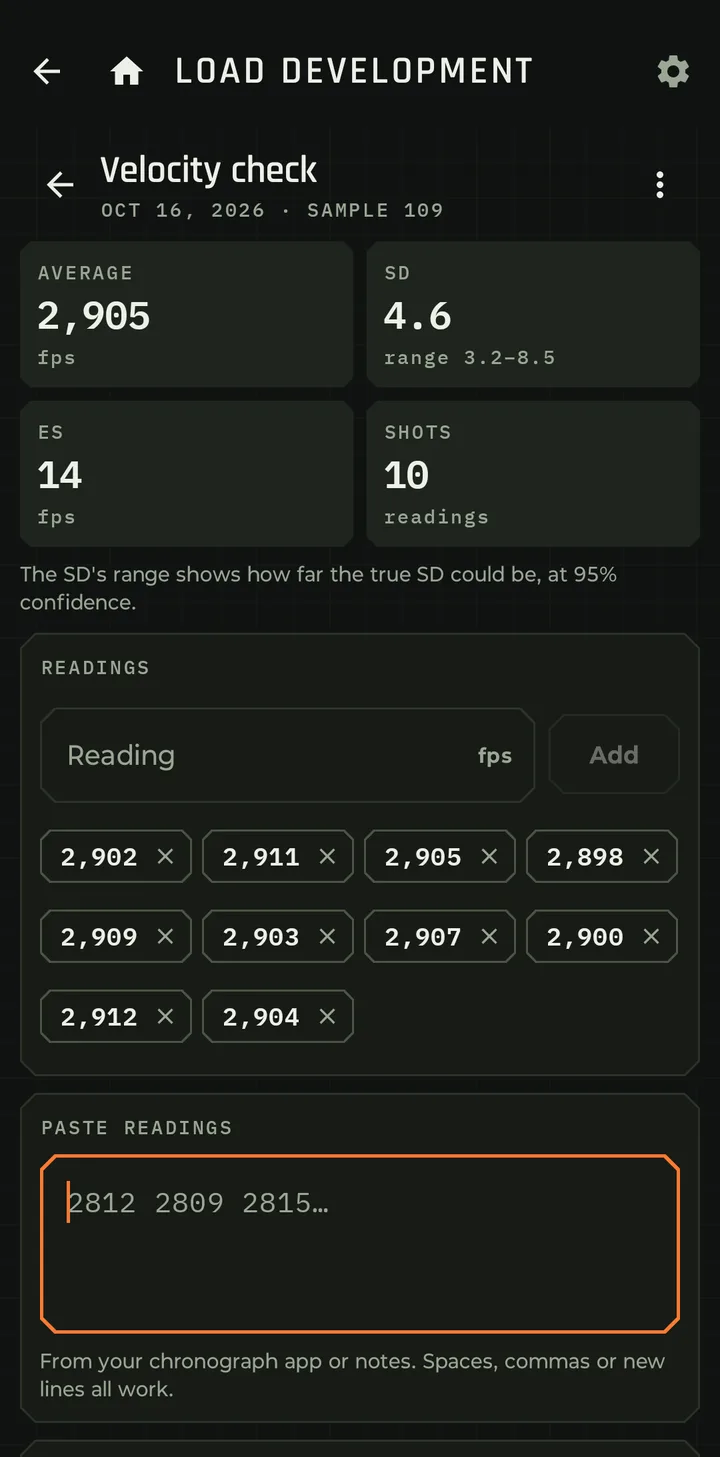
The saved check: average 2,905 fps, SD 4.6 with a range of 3.2 to 8.5, ES 14, 10 readings.
Saved

2,905 fps, SD 4.6 (3.2 to 8.5), ES 14.

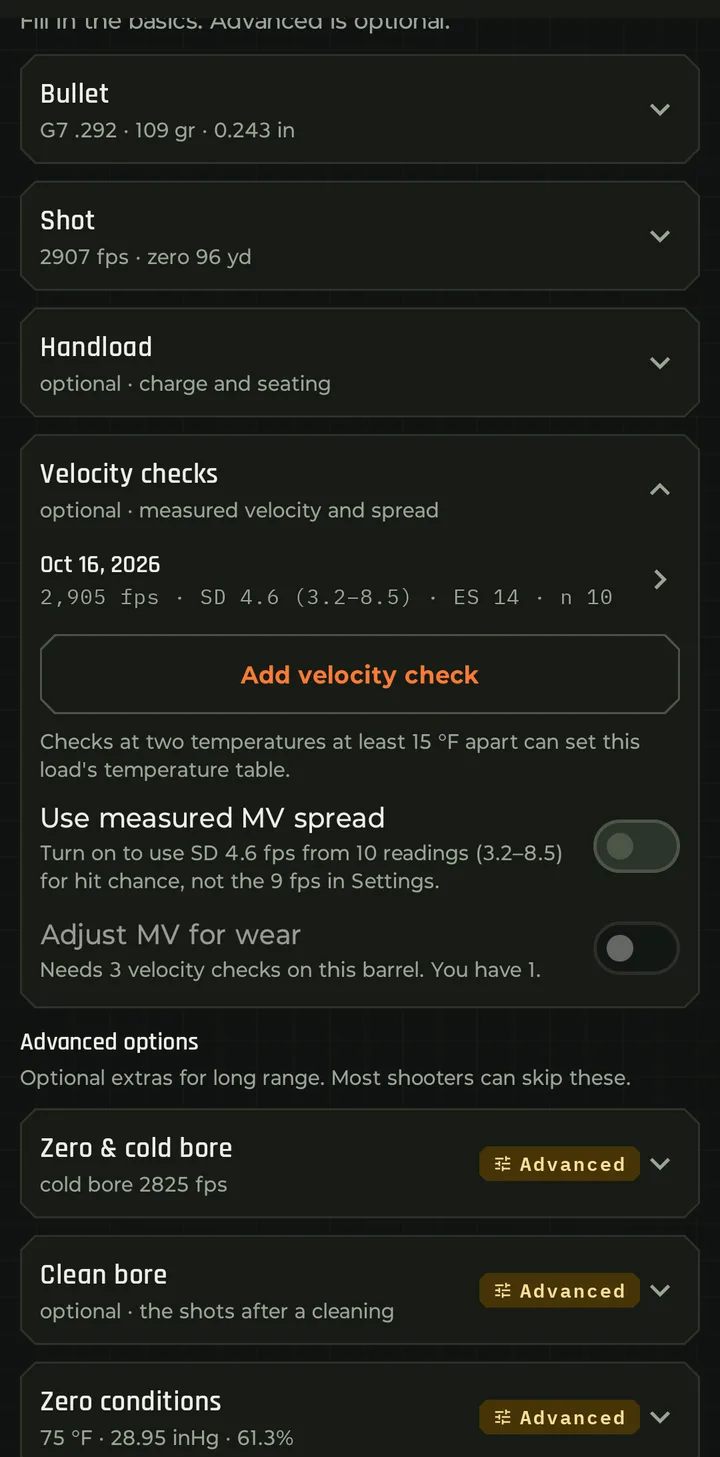
Velocity checks on the load: the Oct 16 check, Add velocity check, and the switches Use measured MV spread and Adjust MV for wear, which needs 3 velocity checks on this barrel.
On the load

Every check, plus two switches that put them to work.

Use measured MV spread

Your real velocity spread

With 10 readings across your checks, hit probability uses your load's measured SD instead of the general setting.

Adjust MV for wear

Velocity that follows the barrel

With three or more checks on the current barrel, the app fits velocity against round count, allowing for temperature. When the change is real, not noise, it adjusts your MV for today's count, for example: -2.1 fps per 100 rounds from 3 checks. Adjusting your MV by -12 fps now. Past your last check it holds steady and tells you it's time for another velocity check.

Your load history

Find it in seconds, years later

The point of keeping records is using them. Every workup stays filed under its rifle, with everything that went into it.

  • Load Dev lists every workup by rifle: the test type, the range of charges or depths, and how many rungs were fired.
  • Each rifle shows its workups next to its barrel and cleaning card, with the rounds on the barrel and life left.
  • Open any test and it's all there: components, date, temperatures, every reading, every group, and which loads came from it.
  • Velocity drifting? Your old ladders are one tap away, with their readings and groups, ready to plan the next test from. Or ask Sagitta to compare them.
  • Backed up. Workups and velocity checks are in the free data export, and sync to your account with cloud backup.
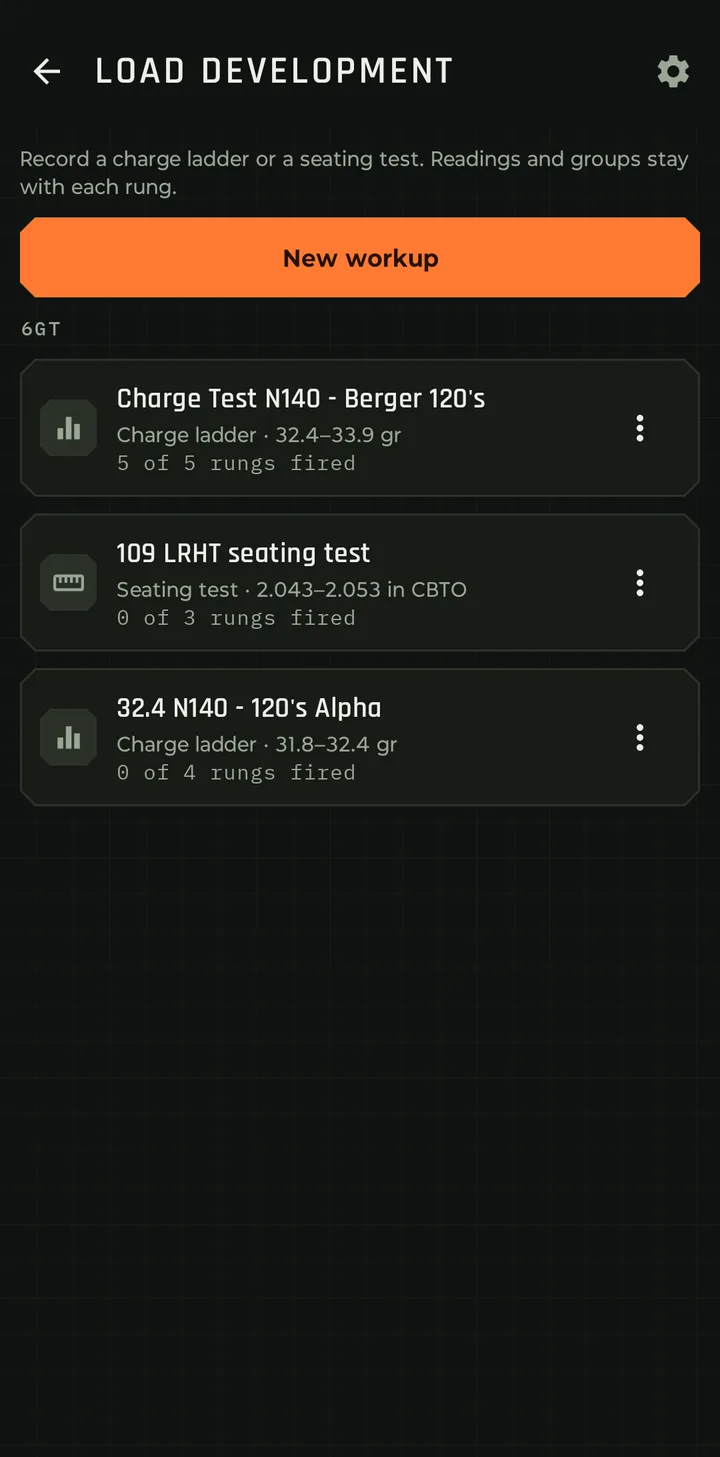
Load Development: a New workup button and the 6GT's three workups: Charge Test N140 - Berger 120's, 5 of 5 rungs fired; 109 LRHT seating test, 2.043 to 2.053 in CBTO; and 32.4 N140 - 120's Alpha.
Load Dev

Every test, filed by rifle.

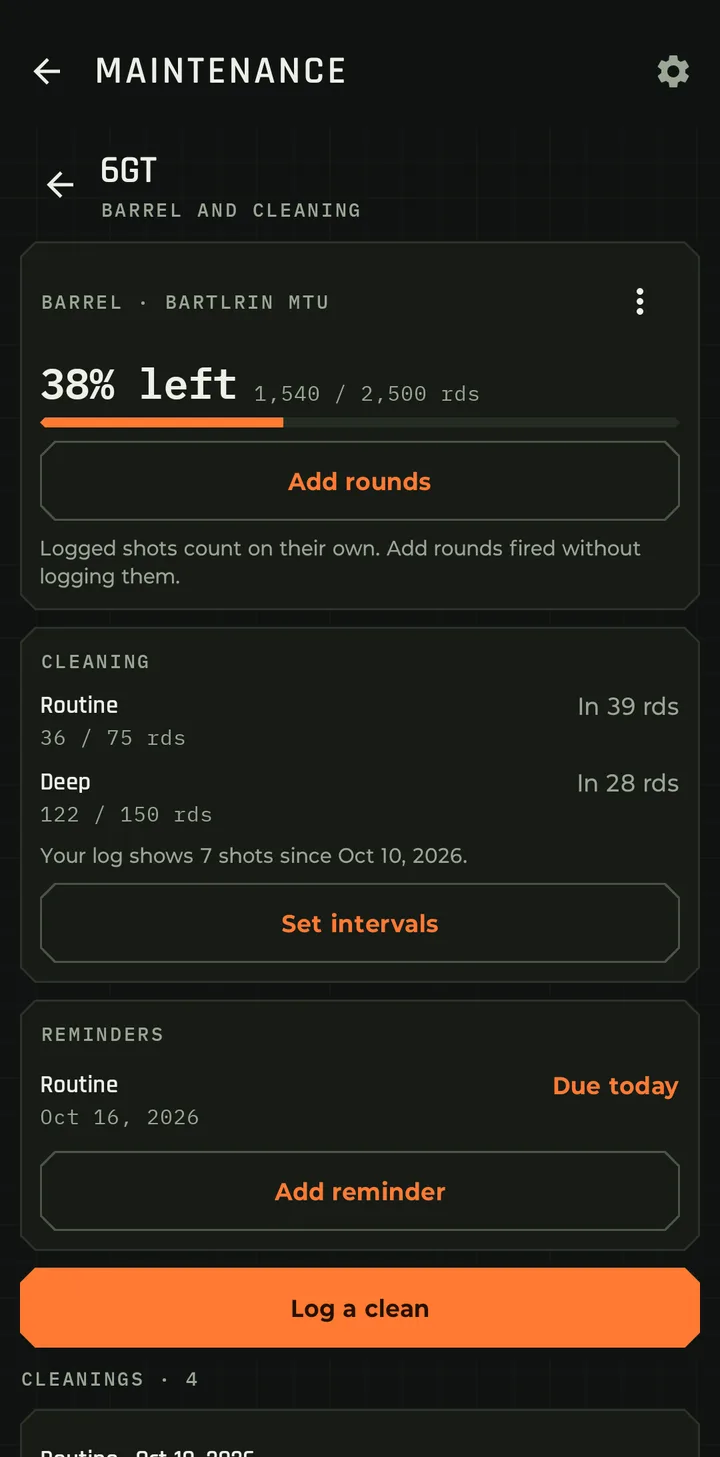
Maintenance for the 6GT: the Bartlein MTU barrel at 38 percent left, 1,540 of 2,500 rounds, cleaning intervals and reminders, with the rifle's workups further down.
The barrel

1,540 of 2,500 rounds, with the rifle's workups below.

Good to know

The details

Big ladders

Fill between builds up to 25 rungs at a time. Need more? Use a larger step, or add rungs to the workup later.

Works offline

Record readings and groups with no signal. Sagitta and cloud backup catch up when you're connected.

Safety first

The app records your tests. It doesn't suggest maximum charges. Always start from published load data and watch for pressure signs.